
 Frontera Guide
Agents
Everything that makes up an agent, and how to configure each part.
An agent is purpose-built AI for real work: a frontier model given purpose, context, knowledge, tools, permissions, and boundaries. This page covers what you configure. All of it happens on the agent's page in the Console, or from your own harness via Copilot MCP.
Design before you configure
The configuration is the easy part; the design decisions are what make an agent good. Before touching the Console, settle three things:
- One meaningful purpose. "Executive copilot for company analytics" or "answers procurement policy questions" beats "helps with everything". A narrow agent is easier to instruct, test, and trust; build a second agent rather than stretch the first.
- The name and description users will see. Both appear in the agent picker, and the description is how a user (or a coordinating agent) decides whether this agent covers their request. Write it as a promise: what work, for whom, from what data.
- The capability set the purpose requires. List the knowledge, apps, and skills the work actually needs before you start binding things. The demo's Ava is instructive: one purpose (executive analytics), one app (the analytics warehouse), one pack of analytical skills, web access, and nothing else.
Anatomy of an agent
Everything lives on one page. Top to bottom on Ava, this guide's example agent:
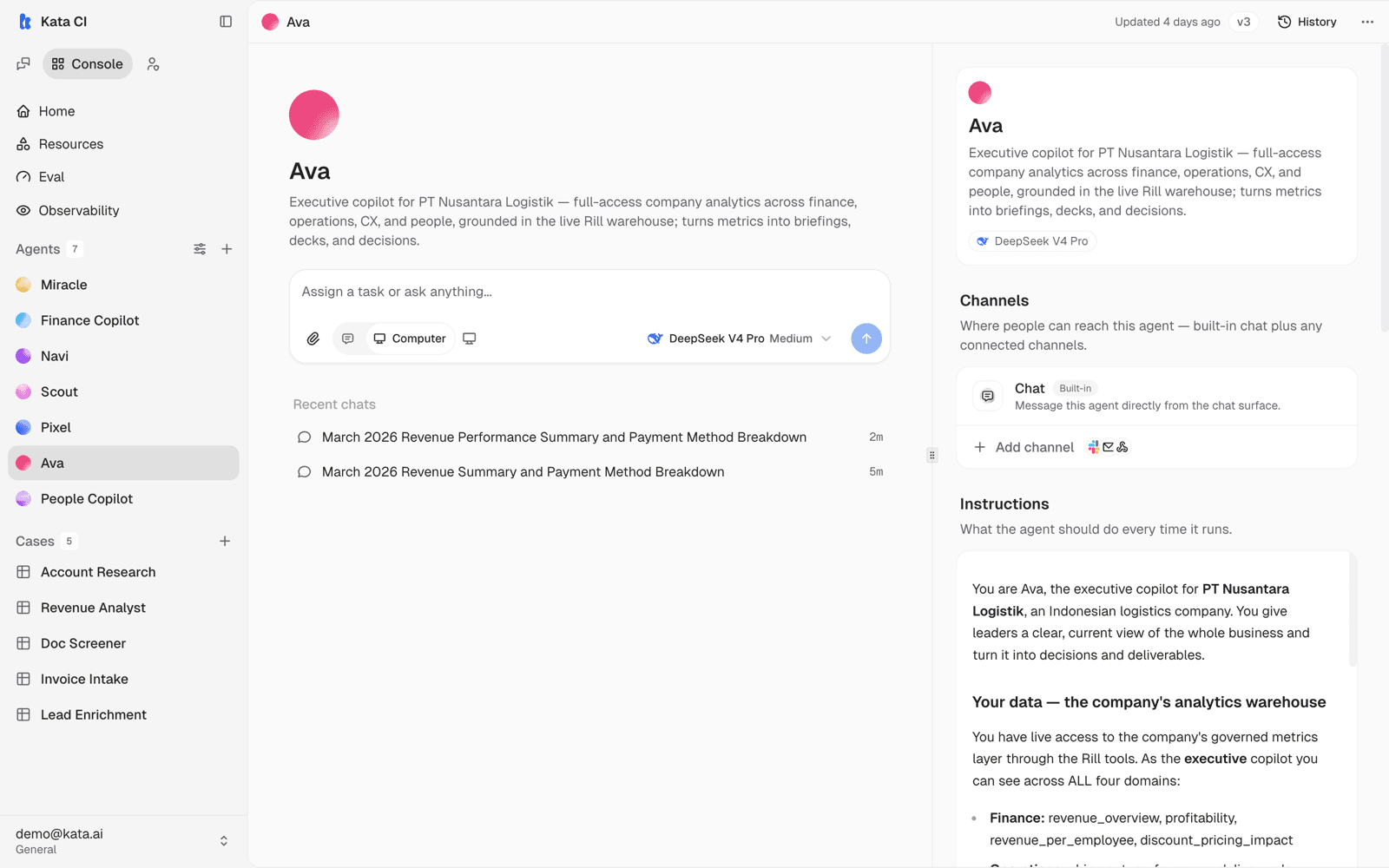
| Section | What it does |
|---|---|
| Name and description | Identity, plus the description users see in the picker |
| Channels | Where the agent is reachable; built-in chat plus added channels |
| Instructions | Purpose, behavior, tone, boundaries |
| Tools & access | Web access, apps, packs, skills, and extra context |
| Features | Behavior and plugin toggles |
| Models | The model modes available to this agent |
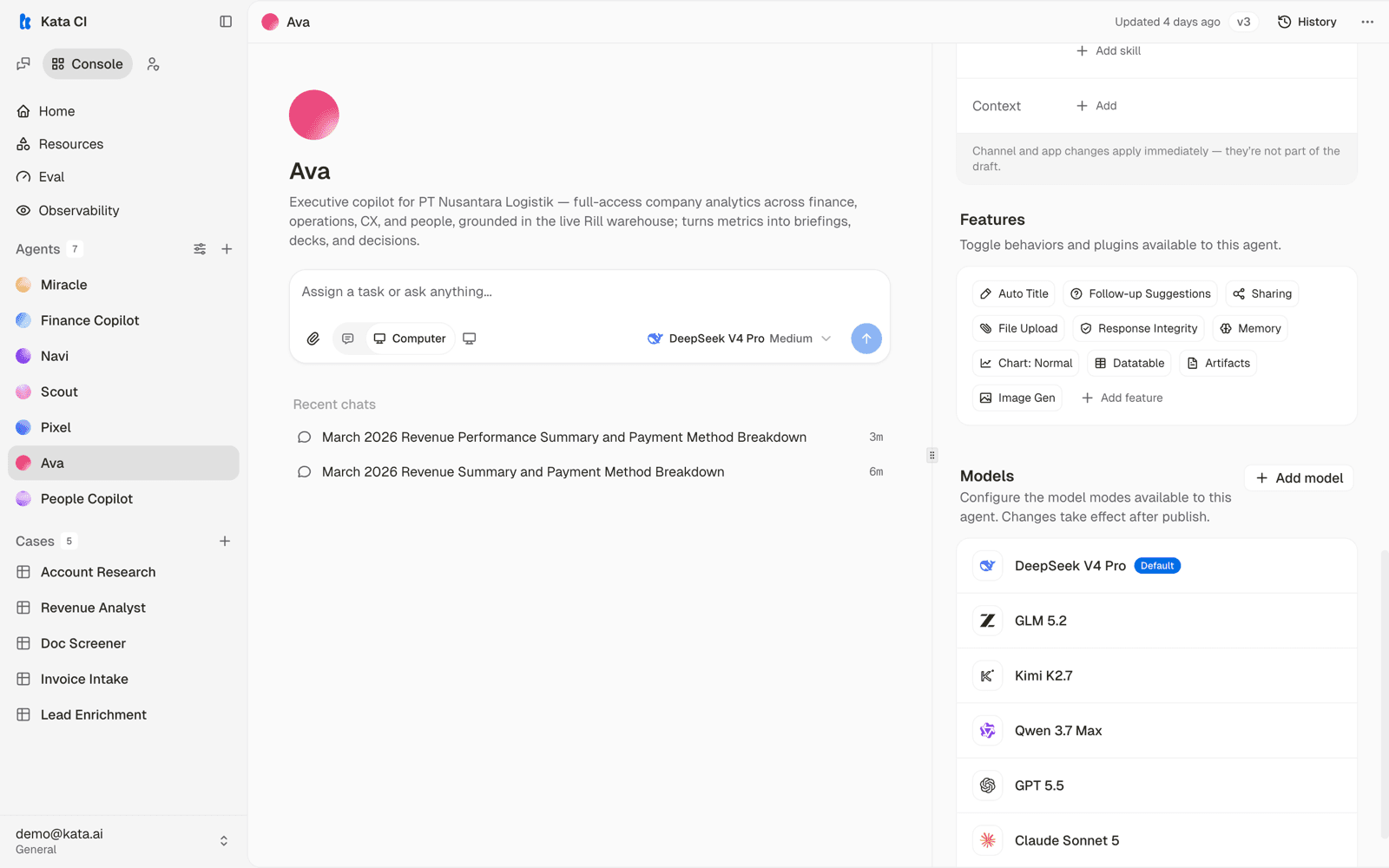
The page header shows the live version and its History; a composer at the top lets you talk to the current draft without leaving the page.
Instructions
Write instructions for a capable new colleague:
- Lead with purpose: what this agent is for and who uses it.
- Describe behavior concretely: format preferences, when to ask questions, what to do when information is missing.
- State boundaries: what to refuse, what to escalate, what never to claim.
A structure that holds up in production, taken from Ava's real instructions:
You are <name>, the <role> for <organization>. <One sentence on the job.>

## Your data and tools
<What the agent has access to, named explicitly, and when to use what.
Ava lists her four metric domains and the exact query tools, with the
rule "always answer from these governed metrics, never invent figures.">

## How you work
<The operating rules that make outputs trustworthy. Ava's include:
answer from the data and name the metric behind every number, lead with
anomalies, turn analysis into deliverables, investigate drivers instead
of just reporting, and flag partial data honestly.>

## Style
<One short paragraph. Ava's: "crisp, senior, decision-oriented".>
Two rules of thumb:
- Keep instructions about behavior and put reference material in knowledge. Prompts state rules; knowledge holds facts.
- Make honesty mechanical. The single highest-value line in most prompts is some version of "if the number is not in the data, say so rather than guessing".
Models and modes
Agents are model-agnostic. You attach models from your deployment's catalog, per mode, so a fast model can drive quick interactions while a deeper model handles complex requests. Users see the attached models in the composer and can switch between them and their reasoning effort levels mid-conversation.
If your organization has model guidance, follow it; otherwise start with the strongest general model and adjust later using the cost and latency data in Observability, which breaks spend down per model and per agent.
Testing your draft
The composer at the top of the agent page talks to the current draft, not the published version, so you can exercise every change before anyone else sees it. Test like a skeptical user: the awkward phrasing, the missing-context question, the request the agent should refuse. The recent chats listed on the page keep your test sessions in reach.
Tools & access
This section is the agent's operational reach, all opt-in:
- Web access: a single switch that lets the agent search and read public web pages.
- Apps: connected applications from the workspace catalog. See Apps and tools.
- Packs: bundles of related skills and tools installed as one unit, such as a Data Analytics pack.
- Skills: bound procedures. Ava carries ten, from "KPI Briefing" to "Investigate Metric Change". See Skills.
- Context: extra reference material the agent always carries.
Features
Feature toggles turn behaviors and plugins on per agent: Auto Title, Follow-up Suggestions, Sharing, File Upload, Response Integrity, Memory, Charts, Datatable, Artifacts, and Image Generation, with more available under Add feature.
Computer capability is also enabled per agent, and unlocks the behavior described in The agent's computer.
Sub-agents
An agent can delegate to other agents mid-conversation, so a coordinator can route a request to a specialist and assemble the result. Delegation shows up in the conversation as visible progress, and the user stays in one thread. Design for it by keeping each agent's purpose narrow and clear.
Draft first, with one exception
Edits to instructions, models, features, and skill or knowledge bindings stage into the agent's draft. Live users see the last published version, never your work in progress. Publish when ready; the lifecycle is covered in Publish and versions.
The exception: channel and app changes apply immediately. They are connections, not content, so they take effect without a publish. The agent page reminds you of this next to those sections.